 About Stats Privacy Patreon
 Technical details of integrating API Gateway and CloudFront
2025-10-28, by DrFriendless
This problem took me 4 days to figure out, so I’m going to document it here in the hope that I save someone somewhere some time. To be fair, two of those days were the weekend but it was on my mind.
Extended Stats is a mostly serverless architecture. I do like the concept of serverless, but I feel that when you’ve got enough work for a dedicated server, it’s very likely having that dedicated server is going to be more efficient. And furthermore, dedicated servers don’t have any cold start time. So the Extended Stats architecture is a mish-mash of serverless and serverful, depending on what seems best for the use case.
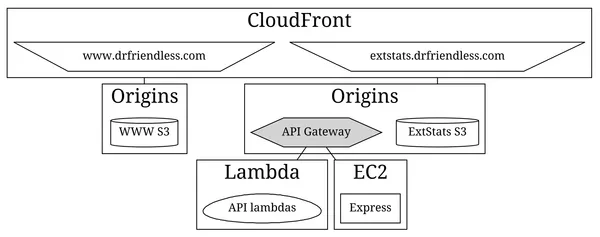
I have just one server (well, currently 2 until I kill the old blog), and it runs an Express server. The Extended Stats API is implemented by API Gateway which directs some calls to the Express server, and some to various Lambdas. This API Gateway has the custom hostname api.drfriendless.com, so that I don’t need to care whether I’m hitting a Lambda or the Express server, the URL doesn’t change.
That works well enough, but some of the API is used by the web pages on extstats.drfriendless.com, e.g. to load all the data to be displayed. The API is also used by a few widgets that want to update the database, e.g. the FAQ widget on the front page. And because that code is making a POST request, CORS gets involved. The road to Hell is paved with CORS.
For the thus-far innocent, CORS is a browser feature that stops web pages messing with each other’s servers. Say I am using dodgy.drfriendless.com, a site of ill repute. In another browser tab, I am logged into firstbank.com, so my browser has the cookie for the firstbank.com login. If dodgy.drfriendless.com makes a call to firstbank.com to change data (e.g. to steal money), the cookie would be sent and the bank’s web server would do what it was told.
But CORS stops that. CORS says “hey, dodgy.drfriendless.com is different to firstbank.com, before allowing that call to go through I’m going to ask firstbank.com whether dodgy.drfriendless.com can do that.” And the bank of course says HELL NO and dodgy.drfriendless.com’s call fails.
Which is fine, but in the case where extstats.drfriendless.com tries to modify data in a call to api.drfriendless.com, CORS still intervenes. Rather than argue with CORS, the easy way is to make extstats.drfriendless.com/api connect through to api.drfriendless.com. So when you load a page from extstats.drfriendless.com, it comes from the S3 origin within CloudFront, but when you make an API call to extstats.drfriendless.com it goes through to the API Gateway origin. CORS sees that both are extstats.drfriendless.com so it’s happy.
But here’s the wrinkly bit. When you deploy API Gateway, the site gets given a URL like https://jum813dn0n53n5e.execute-api.region.amazonaws.com. Then you give it a custom host name to say “well let’s just call that api.drfriendless.com”.
Then you go to CloudFront and create the origin that brings in the API Gateway, and you have to specify the Origin domain. Luckily there’s an entry there for API Gateway, so you choose that and the AWS console inserts https://jum813dn0n53n5e.execute-api.region.amazonaws.com and you say cool, that’s the right one. And then when you try to access anything through https://extstats.drfriendless.com/api, you get a 403 Forbidden error.
Well it seems obvious in hindsight, but the problem is that https://jum813dn0n53n5e.execute-api.region.amazonaws.com doesn’t work any more. When you set uo the custom hostname for API Gateway, you have to disable the default endpoint (https://jum813dn0n53n5e.execute-api.region.amazonaws.com), because the console tells you to. So in the CloudFront origin, your Origin domain needs to be api.drfriendless.com, and not jum813dn0n53n5e.execute-api.region.amazonaws.com, despite AWS really helpfully filling that in for you.
Yeah, it took me a while.
Extended Stats is honoured to be powered by boardgamegeek.com!
